
Weekend Happy Hours
Ding-ding-ding, it’s Happy Hour! Until 1st November, let’s make hay while the sun shines.
Get some free power at the weekend when you use less during weekday tea times.
What’s the deal?
Reduce your usage in two Saving Sessions during the week to unlock one hour free at the weekend.
FYI: You'll need to have a smart meter and direct debit, plus be part of Octoplus. T& Cs apply.
Our step-by-step guide to a happy weekend
1. Join Octoplus and Saving Sessions (you'll need to have a smart meter & Direct Debit set up)
2. Look out for our Power Down Saving Session invites and opt in
3. Use less electricity in 2 Power Down sessions to unlock 1 free Happy Hour
4. Keep track of your Happy Hours on your Saving Sessions dashboard
5. Schedule your Happy Hours - bookings open towards the end of the week, so head to your dashboard and pick a time slot that suits you. If you’ve lots stacked up, you can use two hours at a time.
6. Enjoy! Make the most of that free electricity.
Enjoy free power when YOU want it
We know you’re probably out and about a lot at the weekend. So instead of giving you free power at a set time, we’ll give you a few different Happy Hour slots to pick from (generally on a Sunday in the middle of the day) so you can choose the one that suits and plan around it.
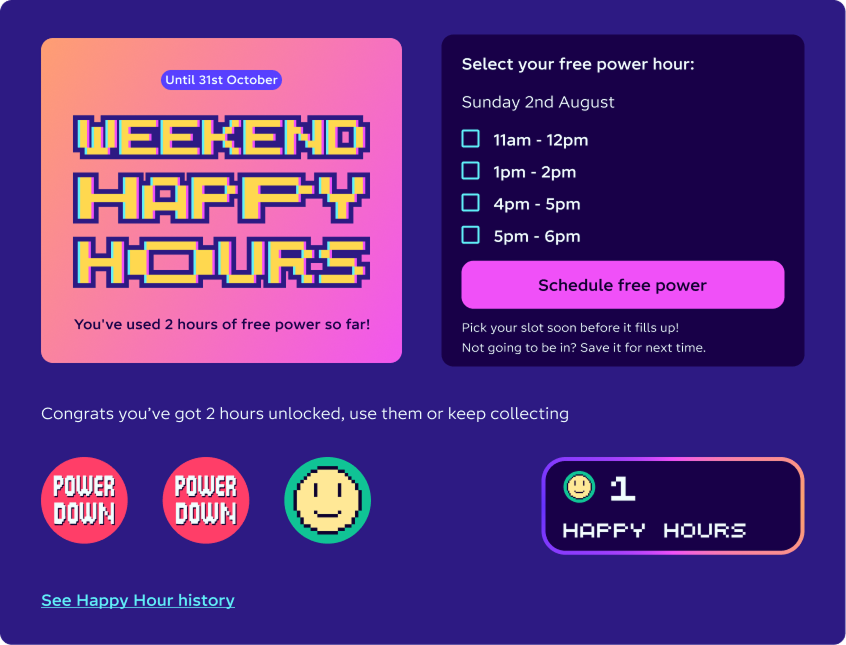
Save up your hours
No need to use your free power straight away, Happy Hours can be saved up for a weekend that works for you (and you can use up to two at a time!) Just make sure you use them by 1st November.
Fill your boots with free power
During a Weekend Happy Hour, all the electricity you use is free up to 16kWh (which is more than any normal home could use – it’s enough to light up a stadium!) Your standing charge is charged as normal.
Why do I have to use less electricity to unlock free electricity?
The UK energy grid is a delicate balancing act. Think of a big see-saw with fossil fuels at one end, green energy at the other. At tea time, the see-saw is often weighed down by fossil fuels as the grid tries to keep up with rising energy demand. The balance swings in the other direction at the weekend, when renewable energy floods the wires (sometimes going to waste if it’s not used up).
To end our reliance on fossil fuels, we need to change the way we use energy. Instead of all powering up at peak times, it helps if we can be more flexible and shift our mindset to make the most of greener, cheaper times. That’s why we’ve introduced Weekend Happy Hours. By encouraging you to use less electricity at tea time, and saving some of that life admin until the weekend instead – we can all have a super positive impact on the energy system.
FAQs
Getting started
We need customers to have a working smart meter so we can work out how much electricity you used in each Power Down session – and whether you managed to use less than usual.
We also need customers to have a smart meter so we can work out how much electricity you used in your Weekend Happy Hours. Once the data is in, we credit your account with exactly what you used during your free hour (capped at 16kWh, but don’t worry — that’s more than any regular home could use in an hour; it’s more like keeping the lights on at a small sports stadium!) – which is what makes it free!
As long as you’re part of Saving Sessions, you’ll be signed up automatically and should see Weekend Happy Hours on your online dashboard.
To take part in Weekend Happy Hours, you’ll need to:
Pay by Direct Debit or prepay
Have a working electricity smart meter (don't have one yet? Get on the list)
Be an Octoplus member (our free rewards programme)
Be signed up to Saving Sessions (our initiative that rewards Octoplus members for helping to balance the grid).
Yes, you can take part too and it will work the same way. Use less electricity in two Power Down sessions to earn one free Weekend Happy Hour and select when you’d like to use it at the weekend.
How Power Down sessions work
We’ll email you to let you know about each Power Down session on the day, so look out for our email invites. To ensure you’re rewarded for your efforts and get a Weekend Happy Hour credit, you’ll need to click the button in the email to opt in.You can also opt in to Power Down sessions on your online Saving Sessions dashboard. A card will pop up at the top of your dashboard to let you know about the next session, with a button to accept the challenge and opt in.
Once you’ve opted in, that’s it. Get ready to use less electricity during the session! Results will appear on your online dashboard within a few days.
For your Power Down session to count as successful and help you to unlock a Weekend Happy Hour, you need to use less electricity than you usually would in at least half an hour of the session.
What do we mean by ‘less than normal’? In simple terms, we look at your historical energy usage to see the average amount of energy you tend to use at the time of the session. If the Session is on a weekday, we’ll look at your half-hourly usage over the last 10 weekdays (excluding Saving Session days and bank holidays). If the Session is on a weekend or bank holiday, we’ll look at your half hourly usage over the last 4 weekend days.
If you use less energy in the first half of the Power Down session, but use the same or more in the second half, this will result in an unsuccessful session, and won’t count towards your Weekend Happy Hours.
There aren’t as many Saving Sessions for Scottish customers – but we’ve cooked up a way to make sure you still get the opportunity to use Happy Hours in the weekend! Let us explain.
Saving Sessions are a tool used by the grid operator to keep supply and demand in balance. At times when the energy supply is super expensive (and polluting), customers get rewarded for using less. In Scotland it’s a little different: there’s so much wind power in Scotland that typically everyone’s energy use is covered, even at peak times. Since there’s no need for Scots to use less, Scotland is often left out of our Power Down challenges.
We don't want you to miss out on Weekend Happy Hours though, so we've decided to level the playing field.
If other regions have had the chance to earn a Weekend Happy Hour, we'll make sure Scottish homes get the chance too.
We'll give you up to two free 'stamps' per week towards a Weekend Happy Hour.
Here's how this works:
If in one week, there are three Saving Sessions, and Scotland is excluded every time, we'll give you two free stamps so that you can book a Happy Hour that weekend.
If in another week, there's one nationwide session (in which you can earn a stamp by cutting how much power you use), plus another one when Scotland is excluded, we'll give you one free stamp, so you still have enough for a Happy Hour.
Enjoy the free power and keep being green and fabulous, Scotland.
How Happy Hours work
You can earn Weekend Happy Hours by taking part in our Power Down sessions.
When there’s a Power Down session, we’ll let you know by email and on your online Saving Session dashboard. You’ll need to accept the challenge before each session to take part.
If you manage to use less electricity than you’d normally use at that time in two Power Down sessions, you’ll earn one Weekend Happy Hour.
Results from your Power Down sessions will take about three working days to update. After that, they’ll count towards your Weekend Happy Hour tally on your Saving Sessions dashboard. Once you’ve unlocked a Happy Hour you can either schedule to use it on that upcoming weekend or bank it for later. You can use up to two per weekend.
Remember, this offer only lasts until 1st November 2026, so make sure you use up your Happy Hours before then or you’ll lose 'em!
Yes! You don’t have to use your Weekend Happy Hours in the same week you unlocked them – you can save them up and use them another time instead.
You don't have to do anything to save them up: just don't book a session and they'll automatically build up in your account, ready for a more convenient time. You can use up to two in one day.
Remember, this offer only lasts until 1 November 2026, so make sure you use up your Happy Hours before then or you’ll lose 'em.
The simple answer to this is: do nothing!
You don't have to do anything special to bank your Weekend Happy Hours. If you don't use them, they'll automatically get saved to your account, ready for you to use them at a more convenient time.
You can use up to two at a time. Just make sure you use them all by 1st November, or they'll disappear!
You can use up to two at a time. So if you have two available and you’d like to use them the same weekend, just select two free slots on your online dashboard instead of one.
Our Weekend Happy Hours will usually be on Sunday daytimes.
Depending on energy demand and grid conditions, this might change. For example, if there’s a big glut of clean power on Saturday, we might shift our Happy Hours so you can use it up.
Very occasionally, if power is exceptionally expensive and Britain’s burning lots of extra fossil fuels, we might not be able to offer Happy Hours that weekend.
This shouldn’t happen often, though.
As much as possible, we want to make sure you can plan ahead – so we’ll do our best to keep it at roughly the same time each weekend.
Yes, but don't worry: no normal home could use more than the limit! All the electricity you use is free up to 16kWh (which is enough to light up a stadium!).
We’ll aim to update your online dashboard with results of each Power Down session within three days (but occasionally it takes longer). This is because it takes a smart meter either two or three days to send your readings to us. That means we have to wait til the three-day mark, when 98% of readings have reached us, before "freezing" the results and uploading them all at once.
This means any Power Down sessions you do from Monday to Wednesday should count towards a Happy Hour that same weekend, but sessions from Thursday to Sunday won’t count til the weekend after.
On your online Saving Sessions dashboard, you’ll see your Power Down stamp light up once the session results are in (as long as you were successful). Once two are lit up, you’ll unlock your Weekend Happy Hour! This will be added to your stash. Once you’ve banked at least one hour, check your online dashboard on Thursday to see time slots for the upcoming free window at the weekend.
If you don’t want to use your Weekend Happy Hour or you’re not going to be in, feel free to save it until later. You don’t need to tell us – just don’t choose a time slot.
We’ll aim to announce Weekend Happy Hour time slots on Thursdays for the coming weekend.
So, if you have one or more free hours banked and you want to use them that weekend, head to your online dashboard from Thursday (or up to 5 minutes before the free power window starts) to schedule it.
So that we don’t put too much pressure on the grid, we’ve limited the number of places available for each time slot. Because of that, it’s worth scheduling your Weekend Happy Hour soon after the time slots are released. If a slot’s full, it will be greyed out and you won’t be able to select it.
Not going to be in? Don’t schedule anything and save your Happy Hour for another weekend.
Two reasons: to reward you for being an awesome customer and to encourage you to help make the energy system cleaner and cheaper to run by shifting a chunk of your energy use to off-peak times.
When energy demand is at its highest (usually around teatime), the network sometimes fires up expensive fossil fuel generators to keep up. Weekends are a different story: on Saturdays and Sundays, electricity demand drops but there’s more clean, renewable energy to use up.
By giving you Happy Hours at the weekend, we can reward you for shifting your energy use away from busy times. You get to do some of the household admin for free – and together we can soak up excess renewables from the grid. A win all round!
Smart tariffs
If you're a Charge Pack customer, set your Happy Hour to the exact time listed in your Charge Pack Session notification email. This will get you a free battery charge, plus free electricity for the rest of your home.
If you're on IO Flux, we suggest picking the 11:00–12:00 Happy Hour time slot. This is often the best time to top up your battery, so is the most likely window to overlap with its charging schedule. Here's how to pick your Happy Hour time slot.
Yes! To get the most out of them, plug in your EV about 5-10min before your free power slot starts. This gives smart charging a chance to kick in before the free hour begins. Remember: your whole home’s electricity will be free during this time too! Win win.
Your credit will be based on the energy price that’s active at the time: so if you’re smart charging, it’ll be based on your cheap rate. If not, it’ll be based on your day rate.
What about boost charging if you already have a smart schedule set up? It’s worth keeping in mind that there isn’t really a financial advantage to doing this: both options will look the same on your bill.
Here’s how it would work if you used 5 kWh:
Smart charge (7p rate). You’re billed 35p. We credit you back 35p. Cost is £0.
Boost charge (40p rate). You’re billed £2. We credit you back £2. Cost is £0.
That’s why it’s better to smart charge if you can. Even though both are free, smart charging helps us keep things in balance. Loads of customers pressing “Boost” at once can cause strain on our systems: it’s kind of like everyone spamming the “refresh” button at once and crashing the Internet. Not good for you or us!
Don't worry, you can still take part! However, some of you incredible seasoned load-shifters might find it tricky to save power during a Power Down because they generally happen at times you probably try to save power anyway. So here's how to get involved.
During Power Down sessions, try to export more than you usually would. 'Exporting more' counts the same way 'using less' does – meaning you can earn Octopoints and Happy Hours.
During your Weekend Happy Hours, whatever electricity you import will be 100% free. There’s no baseline to beat, so you don't need to use more energy than normal to qualify.
If you’re self-powering with solar, you’re likely not drawing much from the grid during the day anyway, so Happy Hours may not make as big a difference for you. However, it's a good idea to run your most power-hungry appliances, such as dishwashers and tumble dryers, or charge your battery during a Happy Hour because any energy that your solar can’t provide will be free.
You get to pick when to use your Happy Hours, which means you can save them up to use in cloudy hours when you're not generating much solar.
Feeling like you don’t get much value from Happy Hours?
It’s true that you may not benefit as much — but the daily savings and export earnings from your tech will already deliver far more value than an hour of free energy a week. Customers have earned £100 million from our export tariffs in the past year alone.
We created Happy Hours to introduce more people to smart energy; showing them how they can benefit by shifting and helping the system. As someone already using smart tech to balance the grid every day, you’re already ahead of the curve: so thanks for leading the way.
We’ve created a new way for some battery customers to save extra by helping the grid in Charge Pack — you might like to check it out. And if you want to spread the word further, you can refer friends to get Octopus solar, heat pump or EV charger and share a great cash reward.
You can still take part! Just keep in mind that how much sense it makes to join a Happy Hour probably comes down to what your Agile rates look like that day.
If your Happy Hour lands at the same time your unit rates are ridiculously cheap (or even negative), your energy is basically free anyway. Also since Power Down sessions tend to happen at peak times, you’re probably already used to avoiding those times – making it hard to save more power against a very low baseline. There’s only so much energy one can shift!
That said – as an Agile pro, you’re already leading the charge when it comes to energy flexibility. Sure, it might mean the odd Weekend Happy Hour doesn’t really make sense for you, but your smart tariff rewards more than make up for it. Customers have earned £100 million from our export tariffs in the past year alone.
Troubleshooting
Quick summary
A tech problem is delaying alerts for customers with some email providers, including BT Mail and Talk Talk
We know how frustrating this is and we're working on it
In the meantime...
We'll send you alerts via app notification so you don't miss out if you have one of the impacted email domains below. Download our app and enable notifications
OR if you prefer, follow us on X or Bluesky and turn on alerts to make sure you don't miss out
We've heard that some customers are getting our Saving Sessions email alerts way too late, so can't take part (and therefore miss the chance to work towards a Weekend Happy Hour credit!).
Argh, how frustrating! We're so sorry to hear this is happening. We dug into it and here's what we found.
The delays seem to be happening to customers with Talk Talk, BT, Virgin Media, NTLWorld or Blueyonder email addresses. Our tech team says that these providers impose very strict limits on how many messages they will accept from SendGrid, the platform that we use to send out emails, before they block traffic. SendGrid therefore has to send emails to those customers much slower than to other providers.
We'd love to start sending our emails earlier to give these slowpoke providers more time, but we can't: we only find out about the Saving Session timings at about lunchtime.
We're speaking to SendGrid and doing our best to find a workaround because we know this is wildly frustrating for anyone affected.
If you have one of the impacted email domains, we'll send you alerts via app notification so you don't miss out. Download our app and enable notifications. (Psst, app notification invites are nearly ready for everyone else soon too!)
We suggest following our Savings Sessions alert page on X or our Octopus Energy account on Bluesky and turning on notifications. We'll always let you know about Savings Sessions in good time.
If there’s a glitch and we don’t receive smart meter data to tell us how much electricity you used during the Happy Hour, we’ll credit you for the average amount of electricity participating customers used during the Happy Hour.
If a meter glitch happens during a Power Down, you’ll still get a Weekend Happy Hour credit.
There's a slightly frustrating answer to this question: at the moment, we can only send Saving Sessions or Weekend Happy Hours alerts to the primary email on each account. We're trying to come up with a solution, as loads of you have told us that you want your partner or housemate to get in on the action.
Our writer Nicki had this exact problem: her husband's email address was the primary one on their account, so she was missing out on alerts. She got him to set up a simple forwarding system in Gmail and thought it might be useful to explain how she did it.
Here we go!
First, you need to tell Gmail you're cool with forwarding email to someone and they're cool with receiving it from you. Here's how to do that bit:
Open Gmail on a computer and click the gear icon (Settings) in the top right, then select See all settings.
Click the Forwarding and POP/IMAP tab.
Click Add a forwarding address and enter your partner's email address.
Click Next, then Proceed, and OK.
Your partner will receive a verification email from Gmail. Get them to open it and click the confirmation link to grant permission.
Then create the filter
Refresh your Gmail inbox and click the Show search options icon (the sliders) on the right side of the main search bar.
In the From field, type: hello@octopus.energy.
In the Subject field, type: "power down" OR "power up" OR "weekend happy hour" (Make sure to include the quote marks and capitalise the word OR).
Click Create filter at the bottom of the search options window.
Check the box next to Forward it to: and choose your partner's newly verified email address from the dropdown menu.
Click Create filter again.
That's it! Your partner should now get all Saving Session emails (whether Power Up or Power Down), plus reminders to book your Weekend Happy Hour slot. We hope that helped.
If you use a different email provider, we'd suggest typing "How do I forward emails on [email provider]" into Google. You should get pretty clear instructions.
If you don’t get a Weekend Happy Hour after two Power Down sessions, it might be because the results haven't come through yet.
We aim to have results of any Power Down session that took place between Monday and Wednesday on your dashboard by the weekend, so you can book your Happy Hour. But it can take longer if there are any delays in us receiving smart meter data.
If that happens, those results will count towards the next weekend instead. There's no pressure to use your Happy Hour every weekend – once unlocked, you can build them up and use on any weekend you like (until 1st November)/
If results are in and you didn't unlock a Happy Hour – it's likely because you didn't manage to use less electricity in the Power Down sessions. To unlock a Weekend Happy Hour, you need to use less electricity than you usually would in at least one half an hour of the session. Read more about how we work out your baseline.