Cosy heat pump controls

Cosy heat pumps pretty much run themselves, but if you do need to change the settings, it's easy to do from the Octopus Energy App. This blog guides you through the different controls, what they're for and how you use them.
Getting to grips with the basics
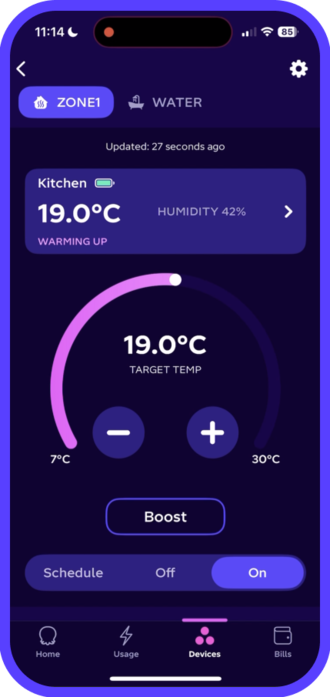
Open the Octopus Energy app and select the Devices tab. Your heat pump will appear showing the current heating and hot water temperatures. Tap the tile to make changes.
At the top of the screen, you’ll see tabs to switch between your home’s space heating zones and hot water system, allowing different “zones” to be heated separately.
Below these tabs in a separate box, you'll see the temperature reading for your primary Cosy pod. In this example, the primary Cosy pod in the kitchen is 19°C.
In the middle of the screen you'll find the target temperature wheel with plus and minus temperature controls. Change the temperature by sliding the wheel or using the buttons.
Near the bottom of the screen, you'll see controls for Boost, Schedule, Off and On. You can read more about these functions below.
Exploring Cosy Modes
Schedule (far left) is the most cost-effective way to heat your home. If you change your temperature in a different mode, it will override your schedule until the end of that time slot.
Off (middle) stops heating but maintains a protective temperature of 7º C. As heat pumps are designed to run continuously, it's best to only use this if you're away 24+ hours.
On (far right) is “manual”mode — your Cosy will work to maintain this temperature around the clock. Once it reaches this temperature, it will go into standby mode.
Boost (middle of the Zone control screen) increases the temperature for a short burst. You'll have the option to set a temporary temperature target and duration.
Hush (in the Settings section) makes your Cosy even quieter. It limits your heat pump's "top end" output, which is the output you'd only need on the coldest days of the year.
Good to know when changing modes
Switching between modes will adjust the heating for your whole home, across all zones.
If your home has multiple zones, you'll have a control tab for each zone where you can set a schedule or change the temperature for each area. If any of your zones fall below their target temperature, Cosy will send heat there (no zone is prioritised over the other and Cosy will work to get all of them just as warm as you need!)
Set a heating schedule
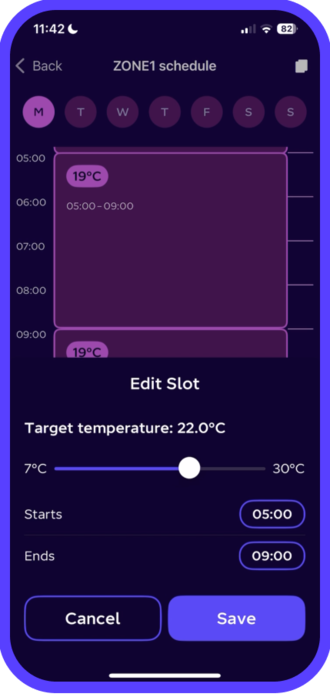
Your schedule is divided into 7 days with time slots for all 24 hours of the day. Use these time slots to set the target temperature – also called your set point – for every half hour.
The shortest slot you can set is 30 minutes, but it's best to set at least an hour to give your Cosy time to bring the system up to the temperature.
On the schedule mode, you'll see a calendar. Tap on any slot to set a target temperature and adjust when the heating starts and ends.
Once you've set a schedule for the day, you can copy this over to other days — saving time if you want your heating to be the same each day! Tap the copy button in the upper right corner and select the days you want to have the same schedule.
Night time schedules
Some people like it cool when they sleep. Others prefer a steady temperature. But, unlike your old boiler, Cosy doesn't like big drops in temperature as it has to work harder to warm your home again. So keep this in mind when setting your temperature.
Good to know when setting a schedule
When you set your schedule, you'll notice each day has 6 heating slots. Don't worry, you don’t need to adjust your temperature 6 times a day, but you will need to pick a temperature and set a start and end time for each slot.
If a slot runs past midnight into the next day, the latest start time you can choose is 23:55, and it must last at least 30 minutes.
To set a slot that starts at midnight, just go to the first slot of the next day. For example, if you want your temperature to be 20°C from 22:00 to midnight on Monday and 19°C after that, you’ll need to head into Tuesday’s schedule to set the 19°C period starting at midnight. Monday’s slot will automatically adjust to end at 23:59, so you’ll still have your 20°C until midnight.
To keep things simple, the end time is disabled on the first day, so the schedule flows a bit more smoothly.
What if you want the heating “off”?
Heat pumps work best when they stay on, so instead of turning yours off completely, try dropping the temperature by 1–3°C.
Set hot water temperature
Select the Water tab at the top of your main controls for your hot water system.
Schedule (far left) is the mode you’ll nearly always want to use for your hot water needs. We’ll discuss how to best set your schedule a little later.
Off (middle) turns your hot water off. Unlike space heating, you’ll see there’s no frost protection setting associated with hot water — here, off means off.
On (far right) is for manual temperature control. When your Cosy is set to “On” for hot water it will continue running to keep your hot water at the set temperature target.
Important to remember
Hot water production always takes priority over space heating. In other words, if your Cosy gets a signal to make hot water and heat your home at the same time, it will always choose to make hot water first and then return to space heating – ensuring you never end up without enough hot water for your shower, bath, or washing up.
Top tip: We recommend running your hot water on Schedule rather than On mode to make sure there's a good balance between your hot water and heating.
How to schedule water
The best way to make sure you have all the hot water you need is by scheduling your Cosy to make hot water in the early morning hours — especially if you're on our Cosy Tariff.
Setting a 60-90 minute hot water schedule at 04:00 will give Cosy time to make lots of water for your morning showers and heat your home ready for when you wake up.
Good to know: your hot water should stay nice and hot for most of the day, even if it's produced first thing. Most people see their water drop about 3ºC over 12 hours.
You can copy the schedule to other days using the copy button in the right-hand corner.
Setting the temperature of your hot water tank
We recommend setting your hot water tank anywhere between 40-50ºC, depending on how hot you like your shower. For general use, theres's no need to go higher than that.
Remember: hot water can scald and burn easily. If you have vulnerable people or children in your home, 44ºC and below is best to keep everyone safe from accidental burns.
Legionella Cycle
Legionnaire's Disease is a rare but harmful bacteria that can grow in warm water that goes undisturbed for long periods. It's not really an issue in residential systems today, but some customers like to run a legionella cycle anyway. If you'd like to, choose one period a week (early on Sunday morning for example) to schedule your hot water for 90 minutes at 60ºC.
See your Cosy data
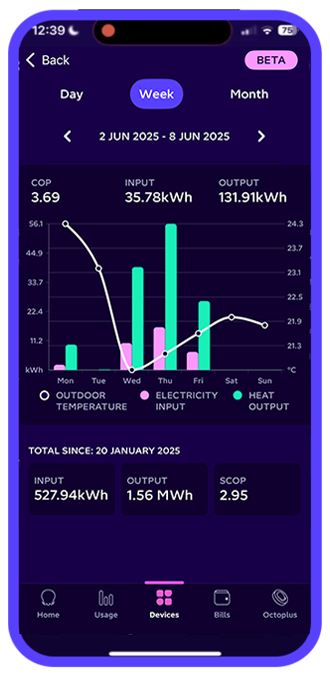
Below the Schedule tile, you’ll find Cosy 6 or Cosy 9 stats. This is where you can see data on your heat pump’s efficiency.
You can view the stats as a graph with different timescales:
Day (shows the last 24 hours)
Live (shows the last 30 minutes)
Month (shows a full month’s data)
Use the arrows to switch between days or months.
What the graph shows:
Electricity input – the energy used to power your heat pump
Heat output – the amount of heat your Cosy generates
Outdoor temperature – the temperature in your home
Just above the graph, you’ll see your average COP (coefficient of Performance)—the ratio of heat output to electricity input. This updates as you explore different time ranges.
All-time data
Below the graph, you’ll find your total power consumption (all the heat your Cosy has generated) and your Seasonal Coefficient of Performance (SCOP).
SCOP is just your COP adjusted for a whole year. While it might seem counterintuitive, COP is usually higher in winter and lower in summer—that’s because it's more efficient to heat your home than it is to make hot water.
In summer, with little to no space heating, your COP will drop, which can make your SCOP look low until you’ve had a full year of data—so don’t worry if it seems off at first!
To find out more about COP and SCOP, and how to use these metrics to check the efficiency of your heat pump, check out this blog.

How to take advantage of the Cosy smart tariff
If you’re on our Cosy Octopus smart tariff, you can set up your Cosy System to take advantage of the super low-cost price dips.
We recommend setting your target temperature 1-2ºC higher than your ideal temperature during these times. So if you like your home to be 21ºC most of the time, try setting it to 22ºC from 04:00 to 07:00 and from 13:00 to 16:00. This will store a bit of extra heat in your home and allow your Cosy to avoid running in higher-cost periods.
We also recommend dropping your schedule set-point back by 2-3ºC from 07:00 to 10:00 and from 16:00 to 19.00. This will minimise how much your heat pump will run during these higher-cost periods and maximise savings.
If you like a bit of extra heat for the overnight period, you can bump your set-point back up from 22:00 to 00:15 to take advantage of our late-night Cosy dip pricing.
Cosy heat pump customers on the Cosy Octopus tariff saved an average of £205 last year compared to using a gas boiler running at 85% efficiency on our standard variable tariff
This figure is based on the actual energy consumption of all Cosy heat pump customers on a Cosy Octopus tariff between 1 Oct 2025 and 1 Oct 2026 , using tariff rates at the time.
We compared this to the cost of producing the same amount of heat with a gas boiler operating at 85% efficiency, priced using our Flexible Octopus (standard variable) tariff at the same time.
Savings from gas standing charges were included only for customers who had fully removed their gas supply (less than 2% of customers). Actual savings vary depending on system design, tariff choice, home insulation and energy use.
Our typical heat pump price is £4,064, which is lower than the national average of £5,408
This is the median post-survey price from all of our heat pump quotes after the £7,500 Boiler Upgrade Scheme has been applied, between 01/06/2026 and 30/09/2026. The national average is taken from the Boiler Upgrade Scheme statistics: April 2026 – median cost of installation Q3 2026.
Cut carbon emissions by 85% with a heat pump
This is the typical reduction in heating carbon emissions using an electric powered heat pump compared to a gas boiler.
The carbon breakdown
Gas CO2 (tonnes per year) - 2.00
Electricity CO2 (tonnes per year) - 0.31
Carbon saving (tonnes per year) - 1.69
Data sources and assumptions
Gas Energy Usage (kWh) 9500 (Ofgem medium use gas usage (Oct 2026))
Heat Pump Efficiency 312% (typical seasonal coefficient of performance from a fleet of Octopus high temperature heat pumps)
Gas Boiler Efficiency 85% (The typical gas boiler efficiency from a BEIS study)
Gas fuel emissions of (gCO2/kWh) 210 (SAP 10.3)
Electricity fuel emissions of (gCO2/kWh) 119 (SAP 10.3)
Based on these sources, heat pumps typically produce lower operational emissions when heating the home than gas boilers.
For more information, explore our Octopus Cosy heat pump fleet performance dashboard.
We're the largest heat pump installer on the Boiler Upgrade Scheme
Based on Octopus benchmarking against Ofgem reports from 2026, and we've continued to grow since.
Our customers love their heat pumps!
93% of people say it's the same or more comfortable than their previous boiler
87% say it costs the same to run or less
83% say it's the same noise or less than the previous boiler
90% say it's just as easy or easier to maintain
We survey all our heat pump customers 3 months post-installation to see how they find their heat pump compared to their previous gas boiler. Survey results are taken from a sample of 2,837 customers:
Comfort: 93% of people say it is the same or more comfortable than their previous boiler.
Running Costs: 87% say it costs the same to run or less.
Noise: 83% say it is the same noise or less than the previous boiler.
Maintenance: 90% say it is just as easy or easier to maintain.
A heat pump is around 4x more efficient than a gas boiler
Heat pumps don't generate heat by burning fuel. Instead, they transfer existing heat into your home. This means they can deliver multiple units of heat for each unit of electricity used.
Based on performance data from a fleet of installed Octopus Cosy heat pumps, typical real-world seasonal performance (SPF or SCOP) is around 3.6. This means around 3–4 kWh of heat is delivered for every 1 kWh of electricity used (an effective efficiency of 300–400%). By comparison, typical UK domestic gas boilers operate at around 85% efficiency, delivering approximately 0.85 kWh of heat per 1 kWh of gas used. On this basis, a heat pump can be around 4× more efficient than a typical gas boiler.
All our heat pumps are independently tested by the Building Research Establishment (BRE), with SCOP values published on the Microgeneration Certification Scheme (MCS) product database. Actual efficiency will vary depending on the property, system design, and usage. For more information, explore our Octopus Cosy heat pump fleet performance dashboard.
The UK's most awarded energy supplier
We've won more awards for customer service than anyone else.
Heat pumps give reliable, consistent heating and hot water
The heat pump user survey report by Nesta from May 2023 summarises that "users are highly satisfied with their heat pumps". It states: "People living in England, Scotland and Wales who own their home and use a heat pump to heat it are satisfied that heat pumps are safe, reliable, quiet heat sources that are effective for space heating and producing hot water." Find the full report here.
The Cosy heat pump is quiet
Heat pump sound power levels are verified by an independent, third-party laboratory as part of the testing process for inclusion on the MCS product database. The laboratory verifies the sound power on the A-weighted decibel curve, as A-weighting closely aligns to how humans perceive "loudness".
All heat pumps are measured using EN14511 standards to ensure uniformity across manufacturers and models. Our Cosy 6 heat pump has a verified sound power level lower than many other heat pumps of the same capacity.
Heat pump heating makes the air healthier in your home
Homes with a heat pump emit far less harmful nitrous oxide (NOx) emissions than those with gas boilers and cookers, significantly reducing asthma and other respiratory illnesses. According to the Sustainable Markets Initiative Cleantech Homes report.
A heat pump can add thousands to your property value
Analysis by the Department of Land Economy at the University of Cambridge suggests a 16% value uplift for new-build homes with enough solar and battery storage to eliminate energy bills. A further study of over five million existing properties indicates a 2-3% value increase for existing homes with solar panels or heat pumps (versus like-for-like gas-heated homes), according to the Sustainable Markets Initiative: Cleantech Homes report, 2024.
As of July 2026, the average house price in the UK is £272,611 according to the Land Registry. Therefore, a 2-3% value increase for an average house priced at £272,611 would be between £5,460 and £8,190.
Heat pumps typically last longer than gas boilers
The expected lifespan of a typical gas boiler is 10–15 years. A heat pump typically has a lifespan of 15–20 years, with UK government research indicating an average of around 20 years. Manufacturer Daikin reports similar ranges. Actual lifespan depends on factors such as installation quality, maintenance, usage patterns, and operating conditions.
Published on

Milly Sullivan
Writer