Meet Streams: why the best time to plug in your EV is 'all the time'

Think you need a complex schedule for your EV charging? Think again. Plugging in every single day is the smartest move you can make. To help you build the habit, we're launching Streams. Track your daily streak, help us keep your prices low and unlock a whole school of funky digital fish.
When you switch to an EV, it’s common to overthink when you should be charging it to save the most money. But on Intelligent Octopus Go, you can throw the schedule out of the window.
The golden rule for charging is simple: plug in whenever you're at home. To help make this eco-friendly behaviour a daily habit, we’re adding a splash of fun to the Octopus app with a brand-new feature: Streams.
What are Streams? 
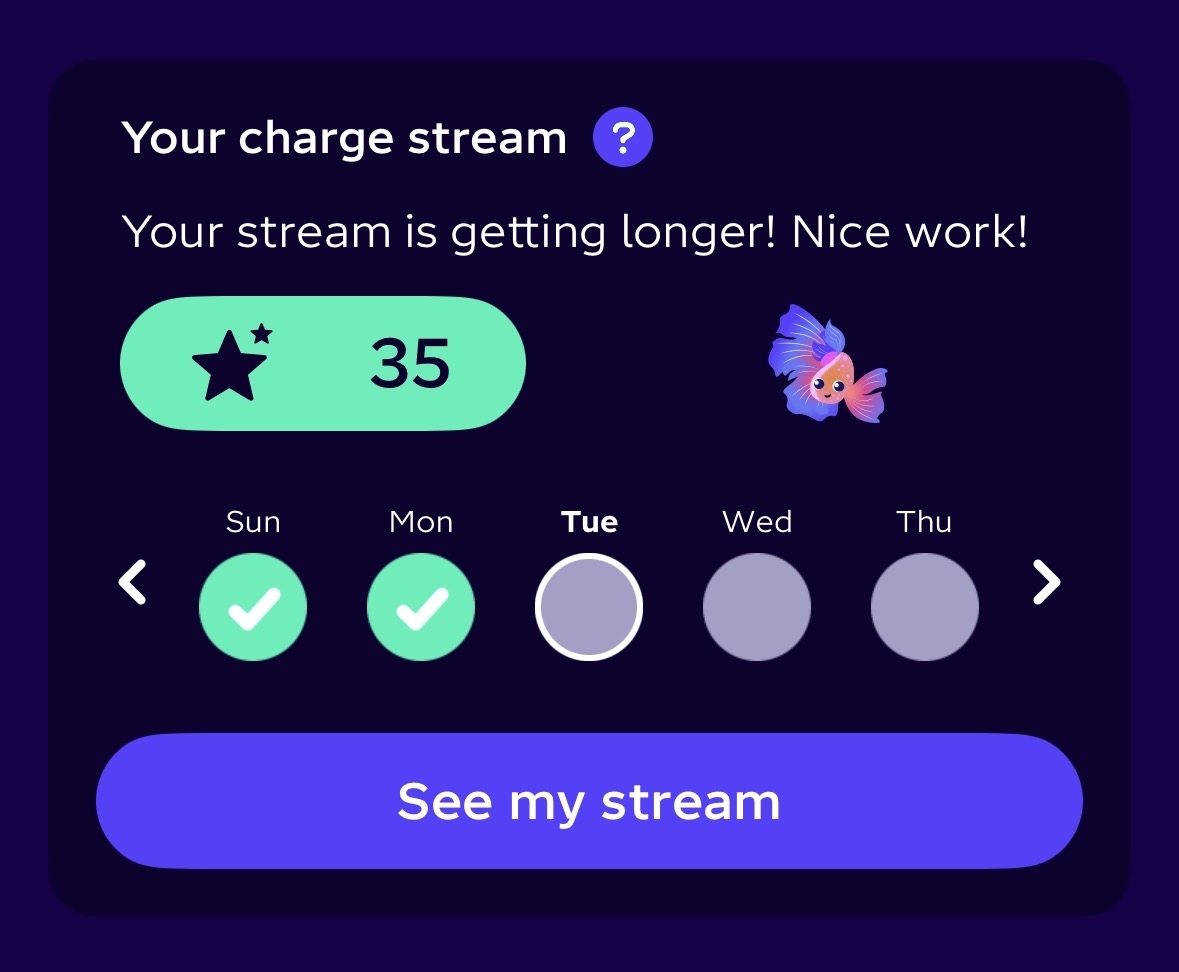
Streams are a new, gamified way to track your daily charging streak. By building a daily charging habit, you’ll give our system the flexibility it needs to snap up cheap, green energy, which helps keep Intelligent Octopus Go prices low — and you'll unlock a series of snazzy digital collectibles along the way.
How to play
Don't break the Stream: Just plug in your EV at home every day to keep your streak alive. (You don't need to do a full charge, just make the connection!)
Check out your Stream: Find it in the app under the “Devices” tab. Each day we check if your car was plugged in and apply a “Stream”, a “Freeze” or a “Miss”.
Unlock rare fish: As your Stream grows and you hit new milestones, you'll unlock a collection of unique, colourful digital fish companions. You'll start off with 1 fish and there are currently 21 to collect, with more on the way.
Automatic freezes: Life happens! If you miss a day and can't plug in, an earned "Freeze" will automatically apply as a safety net to protect your progress so your Stream doesn't drop back to zero. We'll start you off with 1 Freeze and the longer your Stream gets, the more Freezes you'll earn.
Track your progress: You can view your current streak, see your most recent fishy friends, and check your upcoming milestones right on the main device control page in the app (just below your preferences).
Why do we want you plugging in every day?
While the fish are just for fun, the impact is very real. Think of our tech as a highly trained, energy-sniffing truffle pig. Because the energy grid is dynamic, keeping your car connected as often as possible gives our system more chances to forage the grid for those golden moments of cheap, green energy, which helps us to keep your prices low.
During the summer, for example, solar power does a massive amount of heavy lifting. This creates a huge surplus of cheap, renewable energy flowing through the grid during daylight hours. If your car is plugged in, we can snap up those sunny slots.
‘Wait, won't I get charged peak daytime prices?’
This is the most common worry we hear, but it’s actually the exact opposite. Letting us schedule your charge during the day is how you could unlock bonus cheap hours for your entire house. Let’s break it down:
The overnight guarantee: You always get 6 hours of off-peak electricity for your home between 11:30pm and 5:30am, no matter what.
The whole-home daytime bonus: On top of that, you get up to 6 hours of smart charging for your car every 24 hours. If our tech schedules this charging outside your overnight window, your whole home gets the super-cheap rate for those extra hours, too. So if your car is smart charging at 2pm, your dishwasher and washing machine can also run on off-peak energy at 2pm.
Cheap automatic charging: Even if it happens at 5pm. Even if it’s raining. Even if Mercury is in retrograde and your daily horoscope told you to expect financial chaos. If we schedule it, and you’re within your 6-hour daily EV charging allowance, you get the cheap price.
The cap for thirsty cars: This is pretty rare, but if your car needs a massive top-up and we have to schedule more than 6 hours to hit your charging target, only the first 6 hours will be at the discounted rate. Any extra charging will be at your peak rate (even if it happens during the overnight off-peak window).
Ready to start your Stream?
Next time you pull into the driveway, don't wait for bedtime or try to guess when the grid is greenest. Just plug in, let us do the foraging and watch your collection of aquatic friends grow.
FAQs
Streams are an app-exclusive feature, so if you don't have it yet, you'll need to download the Octopus Energy app.
Finding your Streams is easy:
Tap “Devices”: At the bottom of your screen.
Tap your car or charger
Scroll down and voila: You will see your new Streams view.
If you don’t see the feature, you may need to update your app. Check for updates in the App Store or on Google Play. Or, if you added your car in the past 24 hours, you might need to wait a day or so for Streams to appear.
From this dashboard, you can:
Track how long your current Stream is.
Check your daily history of Streams, Freezes and Misses.
See the most recent fish you’ve unlocked.
Charge Cap and Streams go hand in hand.
Little and often: The best way to build your Stream is to plug your EV in and leave it on standby every day. This allows us to top up your EV battery with smaller amounts more frequently.
Stay under the cap: Because you're topping up regularly, you're much less likely to need a massive charge all at once. This makes it much easier to stay within the 6-hour smart charging limit.
Bonus household savings: Whenever we schedule your 6 hours of smart charging outside of the standard off-peak window (23:30-05:30), your entire household will get the cheaper rate for that duration, too.
Absolutely! As long as you’re connected to Intelligent Octopus Go (even if that's through an Ohme charger, your BMW or Polestar app, or any of our other integrations) you’re good to go with Streams. Head to the Octopus Energy app and:
Tap “Devices”: At the bottom of your screen.
Tap your car or charger
Scroll down and voila: You will see your new Streams view.
If you don’t see the feature, you may need to update your app. Check for updates in the App Store or Google Play. Or, if you added your car in the past 24 hours, you might need to wait a day or so for Streams to appear.
From this dashboard, you can:
Track how long your current Stream is.
Check your daily history of Streams, Freezes and Misses.
See the most recent fish you’ve unlocked.
On Intelligent Octopus Go, we automatically create smart charging schedules based on when the grid is greenest and cheapest. When we tell your EV or charger to start charging, it can’t choose where the power comes from. Typically, this would come straight from the grid, but if your home batteries or solar panels are wired to discharge whenever your charger asks for power, your car will start using your home's stored energy instead. We can’t control this from our end, which is why we highly recommend configuring your battery or solar inverter not to charge your EV while you’re on Intelligent Octopus Go.
Here's why:
It can drain your home battery when you don’t want it to: we’re encouraging you to plug in as often as you can so we can give you as many cheap charging slots as possible. If your battery is set to automatically charge your car, it will put energy into the EV that you may want to put into your home instead.
It’s typically not the best thing to do financially: on IO Go, you get 6 hours of super off-peak charging when we’re scheduling your smart charging. You’ll more than likely wish to use your stored energy at times where you would be paying the peak rate for consumption, or to export at a higher rate than the import off-peak rate.
It can confuse our smart charging: for smart charging to work well, we need to be the only one that can control your charging. If another party, like a solar inverter or battery, tries to take over it can block our efforts to charge and your EV may not reach the state of charge you’d asked for by the morning.
Each setup is different, so it’s hard to say exactly how to configure your technology to ensure that you avoid this. However, our resident expert Phil Steele has written a very helpful guide on how to configure most typical systems - you can read more about that here.
It’s important to note we won’t bill you for charging your car from your own solar or battery system. We’ll only bill what is supplied from the grid via your smart meter readings.
Published on

Philip Steele
Future Technologies Evangelist