


Get to know your Grant heat pump
Stay cosy and in control with guidance and support on how to use your Grant heat pump
Find what you need

Check out our recommended schedule for the Cosy Octopus tariff.

Head back for advice on saving money and how the heat pump works in your home.
Troubleshooting
Why aren’t my radiators hot?
Even if your radiators feel lukewarm, they may still be heating your home efficiently. If your rooms are comfortable and your thermostat is set correctly, your heat pump is likely doing its job. You’ll notice radiators feel warmer when it’s colder outside.
If your room still feels a bit chilly, try:
- Adjusting your heating schedule so rooms are warm when you need them
- Turning up the target temperature by a degree or two
- Checking radiator valves and your system’s water pressure
If things still don’t feel quite right, a few simple checks can help:
- Open radiator valves and bleed any trapped air
- Check and adjust your heat pump’s water pressure
- Make sure your control panel settings are correct (see below)
How to adjust my leaving water temperature
If your heat pump isn’t reaching your target temperature, the water circulating through your radiators or underfloor heating might be too cold. You can tweak this in the control panel:
- Scroll through the main menu and select “Main Zone”
- Use the right-hand dial to increase the temperature slightly
- Press the left-hand dial to confirm
This small adjustment can make a big difference to how warm your radiators feel.
How to open valves and bleed your radiators
Open radiator valves
Thermostatic valves let you control each room’s temperature. They can sometimes stick — simply turn them fully in each direction, then reset to your preferred setting.
Bleed radiators
Cold spots at the top of a radiator? You probably have air trapped inside. You’ll need a radiator key and a cloth:
- Insert the key and turn slowly anti-clockwise
- Hold the cloth under the valve as air hisses out
- When water starts to trickle, close the valve clockwise
After bleeding, it’s normal for the system pressure to drop. Check your water pressure next.
How to check and adjust water pressure
Your system needs water at the right pressure to work efficiently. Over time, it can drop (similar to air in a car tyre) or after bleeding radiators.
Steps:
- Make sure the system is cold before you start
- Check the pressure gauge or control panel — it should read 1–1.5 bar
- If below 1 bar, top up via the filling loop (a flexible, braided hose with levers or screws)
Tips:
- Turn levers or screws slowly, one at a time
- Stop when the gauge reaches 1 bar
- Don’t worry if pressure rises while the system is hot — that’s normal
Why is the outdoor unit smoking or dripping?
It’s probably just defrosting. In cold weather, your heat pump clears ice automatically. The “smoke” is steam, and dripping water is melted ice. It looks dramatic, but it’s perfectly normal.
Why is it showing an ‘AH’ error?
This usually means your hot water cylinder didn’t finish its weekly disinfection cycle.
Leave it for a week - the next cycle should clear the error. Your hot water cylinder disinfects itself once a week, usually at quiet hours. If someone uses water during that cycle, it can pause the process and show a warning. Skipping a week won’t harm your system.
If the error persists after 8 days, contact us.
How to reconnect your heat pump to Wi-Fi
If you’ve changed your router or internet provider, the Aerona 290 might lose connection. To reconnect:
- Open the Grant app or your control panel
- Follow the on-screen steps to select your new Wi-Fi
- Once connected, your heat pump is back online
This ensures you can monitor and control your heating remotely.
Aerona Smart Controller
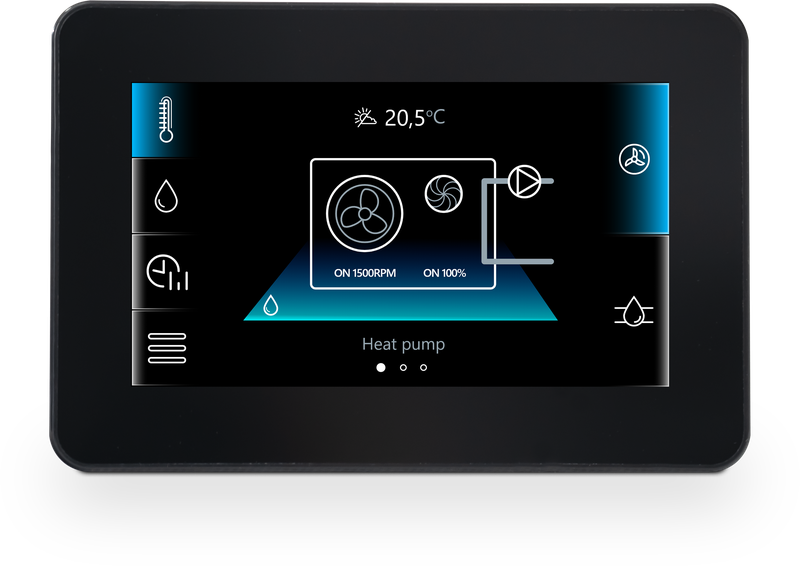
A simple, user-friendly black wall-mounted control system that lets you:
- Set and adjust heating and hot water schedules
- Use daily or weekly timed programming
- Optimise efficiency with weather compensation
App & remote access
- Access remotely online or via a dedicated app
- Control your heating from anywhere thanks to the supplied Wi-Fi hub
Need help setting things up or changing your schedule? Check out the useful resources below.
Still feel like something’s not right? Get in touch.
If you can't find what you're looking for, get in touch...
Call us: 0808 196 6842
Email us heat@octopus.energy
Our aftercare phone lines are open 8am – 8pm Monday to Saturday, 10am - 6pm Sunday. There are other ways to get in touch too.
If you'd like to make a complaint, find our complaints procedure here.

Hey I'm Constantine, welcome to Octopus Energy!
×Close window