


Everything you need to know about using Octopus Charge
Get to grips with the app settings in just six steps
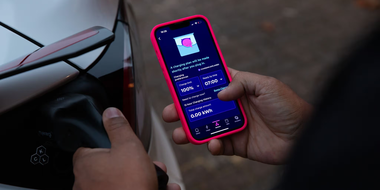
Once you've set up Octopus Charge in your Octopus account, it will be in manual control by default. Manual control lets you create schedules, boost charge and control settings for your charger.

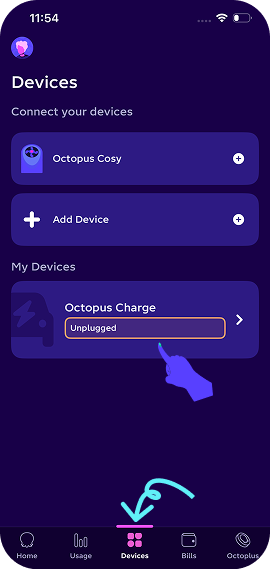
Step 1: Open the Octopus Energy app
Head to the 'Devices' tab by tapping the menu icon across the bottom of the screen. Select 'Octopus Charge' to get to your charger's controls and settings.
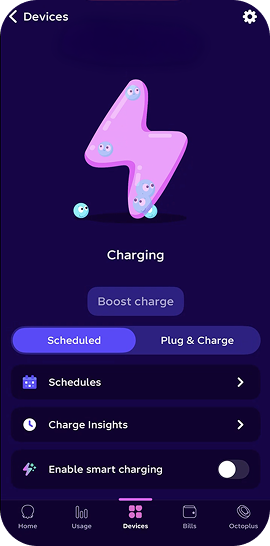
Step 2: Choose your charging mode
On the control screen, you can switch between:
- Scheduled: Charges only at the times you set. The default time is: 00:30-05:30.
- Plug & charge: Charges instantly whenever your EV is plugged in.
- Boost charge: This lets you charge outside of your schedule. This will only be available if the charger is plugged into your car.
- Charge insights: Where you can view your charging history.
- Enable smart charging: If you’re an Intelligent Octopus Go customer, you can enable smart charging by turning the toggle on. This helps you to get the most from your Octopus Charge – more on that in a second.
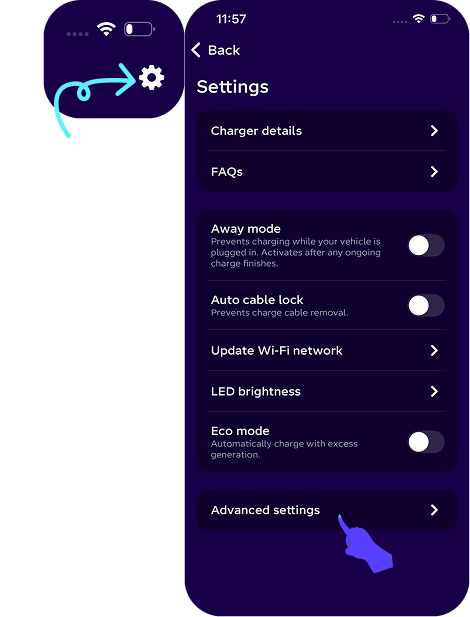
Step 3: Explore your settings
Tap the cog icon to take you to settings. You can then access more options including:
- Charger details: Here you can find the unit serial number, bluetooth PIN and access point passwords.
- Away mode: Turn this on to stop the charger from charging. Turn it off to return the charger to its previous mode.
- Auto cable lock: If you have an untethered charger, this will lock the cable to the charger. It can be turned on and off. If you want to temporarily disable the lock, you can do this by pressing and holding the 'Hold to unlock' button on the control screen. When the cable is plugged back into the charger and EV, it will return to being locked.
- Update Wi-Fi network: If your charger is set up in Wi-Fi mode, and you want to change the Wi-Fi network and/or the password that your charge is connected to, here's where to do it.
- LED brightness: Adjust the brightness of the LED on the front of your charger to between 5% and 100%.
- ECO mode: This powers your EV using your surplus solar energy. Charging will automatically begin when your system produces more than 6 amps of excess generation. Be sure to check your feed-in rates to make sure this is the best option for you.
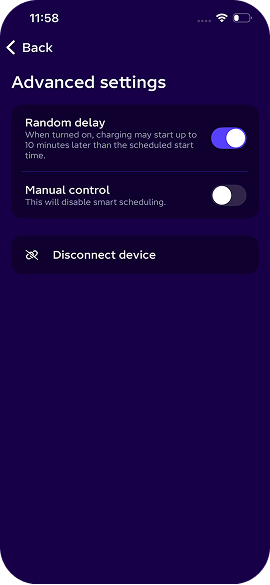
Step 4: Check out your advanced settings
- Random delay: Here, you can switch off the random delay (from 1-10 minutes) which is introduced at the start of a charge. The end of the charge session will stay unaffected. Note: Random delay is used help balance peak demand on the electricity grid.
- Manual control: Smart control is disabled when you switch this on. This option is only visible if you are in Smart control.
- Disconnect device: Only use to this option if you want to disconnect your charger from the Octopus platform.
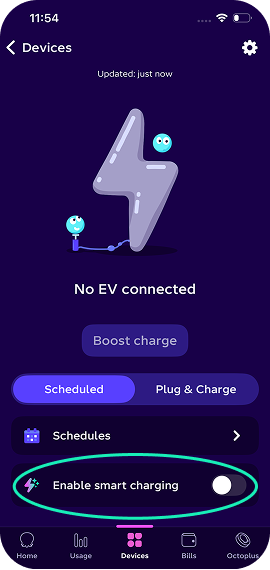
Step 5: Enable smart charging
If you are an Octopus Energy electricity customer, you may benefit from our smart charging option. This will allow you to access off-peak energy between 11:30pm-5:30am.
You might sometimes be able to take advantage of off-peak charging sessions, so make sure to enable your push notifications to find out.
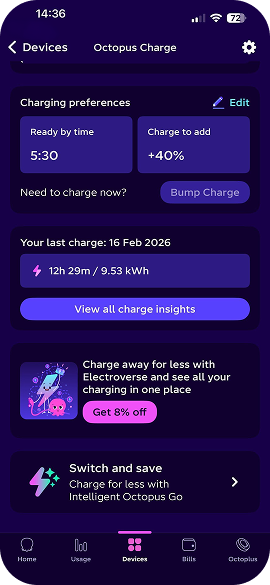
Step 6: View the default schedule or set new times
To do this, tap ‘Schedules’.
- Device status: This shows if your EV is plugged in, and will also show your scheduled charging.
- Ready by time: Tap this option to choose exactly when you want your charge to be finished by in the morning.
- Charge to add: This option sets how much charge you'd like to add to your EV.
If you have enabled smart charging, make sure you've switched over to our Intelligent Octopus Go tariff.
Note: We recommend looking at all available Octopus tariffs to make sure you're on the best plan that suits your household's needs.
How can I switch back to manual mode?
If you prefer to manage things yourself, switching to manual mode is easy. Just follow these steps:
- Open your app to the main home screen.
- Tap the head icon in the top-left corner to open your account settings.
- Select 'Devices' and then tap on 'Octopus Charge'.
- Toggle 'Manual Control' to ON. This will disable smart charging and give you full control over when your car charges.
Note: While in manual mode, your car will charge at your standard rate.
How do I know if I'm eligible for smart charging?
Most EV drivers can start saving with smart charging right away!
- An Octopus Energy Account: You’ll need to be on one of our domestic electricity tariffs.
- A Smart Meter: You need a smart meter that can send us half-hourly readings. This is usually a newer (SMETS2) model or a specific type of older (SMETS1) meter.
- A compatible Car or Charger:
Many brands like Tesla, VW, Audi, and Ford can connect directly to our app. If your car isn’t directly supported yet, don't worry! You can still join if you use a smart charger like an Ohme (Home Pro/ ePod), Indra (Smart PRO), Hypervolt (Home 3 Pro), or Myenergi Zappi.
Contact us
Our online support hub is packed with FAQs, troubleshooting, guides and top tips to help you get the most out of your EV charger - all in one place.
How to get in touch
Call us: 0808 196 6842 Email: charging@octopus.energy (our phone lines are open 9am - 5pm, Monday to Thursday, and 9am - 4pm Friday.)
Need support after installation? Email: ev-aftercare@octopusenergy.services
If you have a complaint
For the fastest response, fill out this form to raise any issues. Alternatively, you can email us on charging@octopus.energy or call 0808 196 6842.
Check out our complaints process.
Hey I'm Constantine, welcome to Octopus Energy!
×Close window